Effects, cursor and sounds
Animated backgrounds, username effects, cursor effects, click sound and glows.
Updated October 22, 20261 min read
These settings are in Customize → Effects.
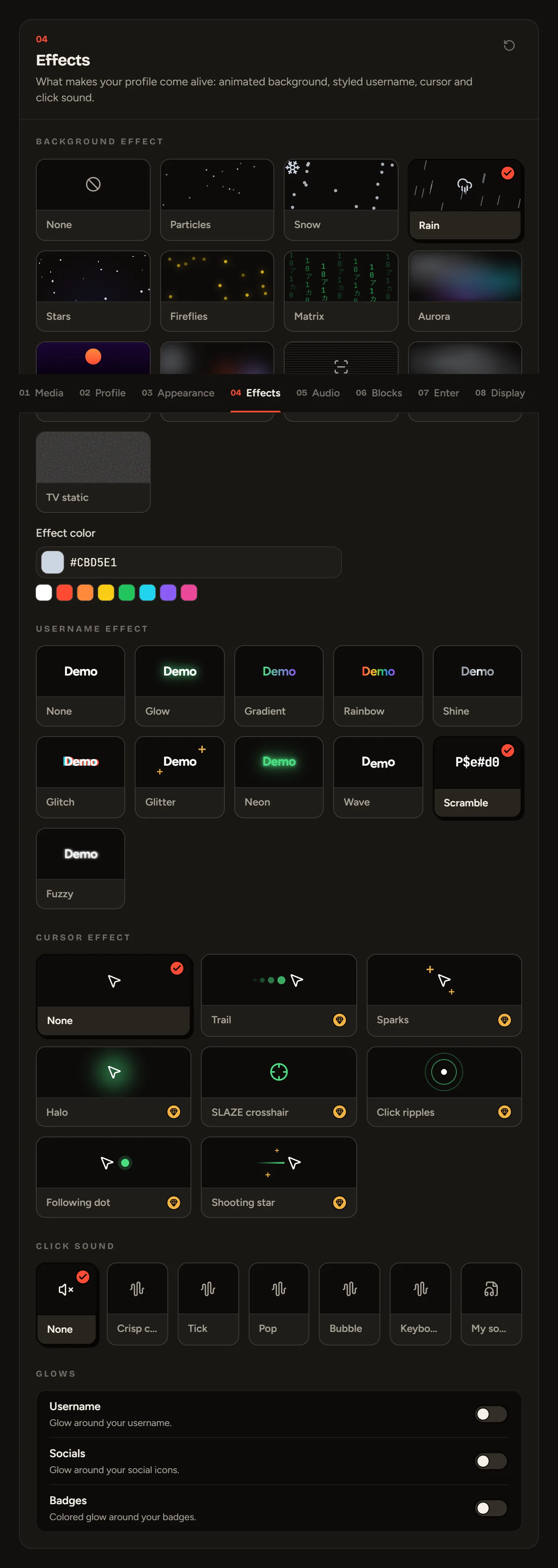
Background effect (free)
An animated effect on top of your background: Particles, Snow, Rain, Stars, Fireflies, Matrix, Aurora, Retro grid, Orbs, CRT scanlines, Smoke or TV static. You can pick the effect color.
Username effect (free)
Glow, Gradient, Rainbow, Shine, Glitch, Glitter, Neon, Wave, Scramble or Fuzzy. The preview uses your display name.
Cursor effect
Trail, Sparks, Halo, SLAZE crosshair, Click ripples, Following dot or Shooting star.
To replace the arrow with your own image (free), head to Media: see Avatar, banner, background and cursor.
Click sound (free)
A little sound every time your visitors click: Crisp click, Tick, Pop, Bubble, Keyboard, or My sound to upload your own (a very short sound, under a second). Picking a sound plays it right away; set the volume below.
Glows (free)
Add a glow around your username, your socials or your badges.
Still stuck?
Email us and describe the problem: we’ll reply by email, in English or French.